

You are using an out of date browser. It may not display this or other websites correctly.
You should upgrade or use an alternative browser.
You should upgrade or use an alternative browser.
Foxpro TX1000 display to bright at night even under lowest settings?
- Thread starter case-nh
- Start date
07yzrysder
New member
Have you set it to night instead of foxpro? There is a setting normal foxpro and night.

07yzrysder
New member
Originally Posted By: takI think there is three different displays, FoxPro, Day & Night. On night setting adjusted down its really dark. I'd have to look at my owner manual to tell you how to get it there.
That's it. Hit back to get to the menu. Then display then change theme to night.
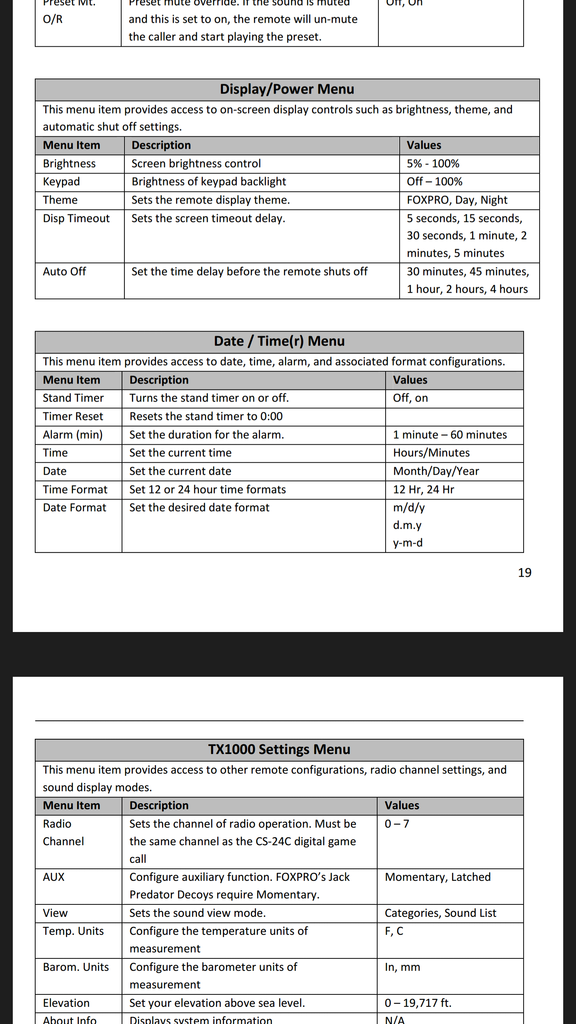
That's it. Hit back to get to the menu. Then display then change theme to night.

FOXPRO
Active member
case-nh,
We are going to look into this, and see if it is possible to get it to go dimmer. It's going to be hard, as there has to be a certain amount of power to the LED to keep it from going out. I can say that this is the first that I've ever heard anyone say it is too bright on the lowest setting. I normally put mine on about 10% in the night mode. I'll update if we are able to get it dimmer.
Regards,
Mike Dillon
We are going to look into this, and see if it is possible to get it to go dimmer. It's going to be hard, as there has to be a certain amount of power to the LED to keep it from going out. I can say that this is the first that I've ever heard anyone say it is too bright on the lowest setting. I normally put mine on about 10% in the night mode. I'll update if we are able to get it dimmer.
Regards,
Mike Dillon

Thanks Mike. Was going to call but will wait to see if there is anything that could be done. Thought of the window tint approach mentioned above but haven't gone that way yet. There is plenty of illumination at the lowest setting on there at night so if it could go lower I think that would be a benefit. Am hunting with D740 and pulsar hd19a for scanning so not using lights. Have to be careful with any light that shines back on me or is visible as you guys well know. Again, thanks and will look forward to a possible update. If you want I could post a question on the night hunting forum asking guys if they would like to see the light dimmer or if they feel like it is to bright. I'm a little surprised it hasn't come up. Much improved remote for me at night so far as being able to read it over the 500. The 500 was dimmer though I'll have to say. I was careful with that also.