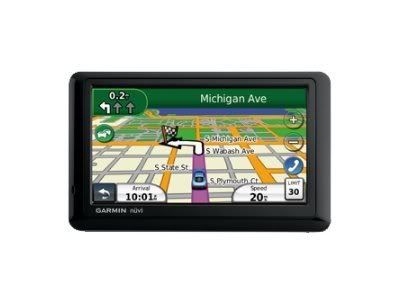
Garmin nüvi 1490T GPS & HuntingGPSmaps.com

KAG

New member
Anything I write is Purely my opinion

I thought I would start a post on this as I broke down and bought a Garmin Color GPS today. I am familiar with them from using the old black and white type GPS but have for the longest been a hard core Map user. Almost feel bad getting one but I am sure it will pass. I bought mine on ebay.

While down in NM hunting with T.T. I really liked his Color GPS and the way it worked and given the amount of open ground around here in KS I thought it might be helpful finding PH areas scattered around here. I wanted this one because of the wide color screen and bluetooth feature.

Once I decided on the unit I started looking for hunting maps and since HuntingGPSmaps.com is a sponsor I thought why not, I originally posted and asked for their free copy but because I ordered the GPS I called to buy the KS map. A guy named "Dave" answered the phone and when asked about the free map offer on PM he did not know what I was talking about. He asked around and told me it was a 14 day trial. No worries because I called to buy it. Then I actually had to work a little to get the guy on track to sell me one and answer my questions about the product. Eventually the Deal was done and he said my "SD" card would be shipped out......

I called back 15 minutes later because I noticed the 1490 only took MicroSD and he stated "SD". Same guy answered and I stated I just bought the KS card and wanted to make sure it was an MicroSD and not a SD because he had stated the SD card would ship. He did not remember me ...no problem...after explaining I had just purchased the Kansas map from him and just wanted to make sure it was a MicroSD card....he simply stated yes and the call ended.

I wanted a map to overlay Google earth also for my computer but by then I was ready to just be done.

After the Map gets here I will update the post with the features and easy of use. It ran me $53.00 for the map.

GPS.jpg
 
Last edited:
The Micro-SD card arrived yesterday....quick shipping. On the website it gives you 2 different options. A card or a down load. Go with the download because then you get the map on your computer and you look at areas in detail. Then you just transfer a copy over to your GPS. With the card you can not do this.

The Nuvi 1490T is big, bright, and colorful. The unit did power down twice with out being prompted. Do not really know why but researching that in the web it seems to be a software issue so I did update it. The unit does not come with a wall charger. It does come with a car charger and usb cable. So I charged it off my laptop. Took several hours...about 5. I am sure the car charger will do it quicker. It has a touch screen that does seem that you need to have firm contact with the screen to navigate the menu.

After I charged the GPS and I put the card in. On the web site it says just put it and you are ready to go. I did that....as I live right next to thousands of acres of Corp of Engineer Land that is public hunting I used this to check it.

On my GPS it did not show up as public hunting. It did show topographical details and such but no boundaries or marked areas as PH. I attempted to trouble shoot it and re-insert thinking I must of jacked it up somehow as it would not be the first time. The GPS shows the KS file as being on the GPS but still no details. I then attempted to call the number and got a Voice Mail. I am sure they are normally are open on Saturdays but because its the holiday weekend I figured that was why. So I am stuck till Tuesday.

If we can not get it resolved then I plan to return it and ask for the download instead. Frustrating but it is what it is.

This is Purely my opinion
 
Last edited:
Originally Posted By: FursniperHere is an idea to try. The GPS can hide/show different map layers. The land status layer might be a map layer that you need to toggle on/off if it is not transparent. Here is a link with instructions on how to hide/show map layers on a Garmin Nuvi and other models.

http://www.gpsfiledepot.com/tutorials/how-to-change-which-map-is-displayed-on-a-garmin-gps/


Thanks for the link, I did do this already.

I downloaded their trial version to my laptop and pulled the map up on my computer to compare. I do like the computer version much better, much easier to navigate around on. The problem remains....

On the computer version I can see some PH ground surrounding Milford Lake area. Both the card and the computer version show contour lines, water, and roads in detail which is Very good and seems to be very accurate. With that said at least 1/2 of the areas I absolutely know are PH are not shown as Government land. I could not source a legend on the map either. I am not even talking about the WIHA areas which is vast and change but purely US Corp of Engineer, State, and other Federal Government land that is open to PH hunting.

I wanted something to get down to the nitty gritty as far as boundary lines that I could use to determine access road points. Its just not there. It may be that maps of the farther western states are in much more demand and more time has been put into research and development of the maps but the KS map offered presently is a No Go for actual usefulness to me.....

I did cross check this with my paper map versions...the paper version shows it. I guess I will use the paper map in conjunction with the Nuvi 1490T to help keep me off TRUE private property....PH signs and markers have a frequent habit of vanishing around here.

This is Purely my opinion
 
Last edited:
Could it be a problem with the GPS? I think the Nuvi are mainly for auto travel. The handheld units may be more compatible to the software.

Steve
 
I'd contact the map vendor and have them compare to what they show on their end. Could have been a bad download and missing some data. Accuracy is extremely important for such maps, without it...they aren't much help.

Tony
 
My GPS has to be selected that you are walking instead of driving for it to show the hunting chip that I put in.
 
Originally Posted By: TonyTebbeI'd contact the map vendor and have them compare to what they show on their end. Could have been a bad download and missing some data. Accuracy is extremely important for such maps, without it...they aren't much help.

Tony

It could be the download but doubt it. The FT.Riley KS boundaries are dead on with the computer down load.... the other Gov / PH boundaries are way off around the area I live. If it was a corruption I would think all boundaries would be off.

I did contact the vender and left a message on Saturday. I called again Tuesday late morning as I had not heard back from them and spoke to a lady there and explained I wanted to return the chip and I did tell he why. She said to just mail it back.....100% happy with that response.


Originally Posted By: 220_SwiftMy GPS has to be selected that you are walking instead of driving for it to show the hunting chip that I put in.

Rgr that....it is and so is the computer version as well as set to highest detail setting and zoomed in and out.
 
Found your thread and decided to follow your lead. Downloaded my map and installed on my 1490. I was surprised to find that the owner info was so up-to-date. One parcel of land on the map shows the current owner who obtained the property a little over 1 year ago. The online maps from the state gov. and county gov. still show the former owner.

Only issue I found was that when I tried to move the map over about 10 miles from my location the GPS would reboot every time. If I just drove to that location everything works fine. Not sure how accurate the boundary lines are in terms of feet, but I figure I am probably within 30 feet or so and I just make sure I give myself a cushion. All in all I think this is a pretty good resource to use with other maps and systems. Glad I found your post.
 
I bought a CA Map from gpsmaps.com & started out using it in my 255 Nuvi, its pretty darn acurate compared to my paper maps.

I bought it mainly for BLM & NF lands because all of the boundary markers especially on the smaller parcels tend to disappear Thanks to the nearby land owners.

I just picked up a Rino 530 HCX, we'll see how it does.

I also went with the micro SD card, so that I can use it in more than one GPS as in my case, where I use it in my Nuvi to get there, then switch it over to my Rino once I start hiking in.

Hope you get yours sorted out, I do know that some of the folks from gpsmaps.com do frequent Len's long range hunting forum you might post up in there GPS forum.

Best of luck, Lee
 
Back
Top