Hunting Business Cards

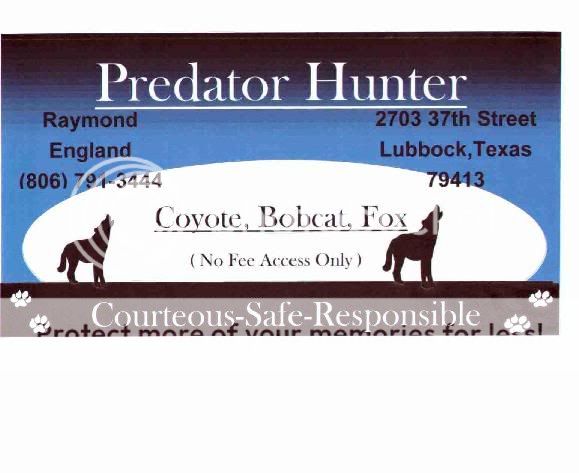
I have a silly question for anyone who can answer it. I used Word to make some business cards and left a space in the upper left-hand corner to put a picure there. But when I go to insert the picture, I lose my bottom lines and the text on the right side of the card shifts to the left.

What am I doing wrong and what can I do to fix it? Any guidance will be greatly appreciated.

 
Darknight,
What I did was to first place the pictures and sized them to what I wanted. the add the lettering. If you put in two I had to put them together in the middle and set the font to fill in from the middle. Pushin the picture to the outside. You may have left space but when you add the pictue it makes its own space and shifts everything. There is also a way to put the picture in the background with the lettering over the top.

Hope this kind of helped.

Skinner 2
 
Another question for Skinner2 and Calypso. Whenever I paste a picture, regardless if I do it prior to entering text or not, text cannot occupy space on the same lines the picture occupies. I hope I'm explaining it clearly. What it looks like on the page is:

Text

(picture in this space)

Text

How I'd like it to look is:

Text
Text
Text picture
Text picture
Text picture
Text

I know it must be a simple solution, I just haven't figured it out. Thanks for the help, and I wouldn't change a thing about your cards.

Blake
 
Blake,
If you are trying to place the pictures in the corners with lettering in between Place the pictures close together in the middle instead of the corners. Have the center justified button clicked, set the font, place cursor in between and type away. You will have to play with the size and spacing to get the look you want. It took me I don't know how many tries to work my card out.

Hope this helps.

Skinner 2
 
Blake,

One other trick that you may want to try is to open a text box on your screen where you are creating your card. I wanted a coyote picture in the upper left corner of my card so I went to Insert > text box. Your cursor will turn into a + sign. Click on your mouse and drag it into the approximate size box that you want to put your picture in. Insert your picture in the box, type your text in, adjust, fiddle, test print, fiddle, and eventually you'll have it!
Thanks again to the gentlemen who helped me with mine, they look great! /ubbthreads/images/graemlins/laugh.gif
 
I finally was able to put together a couple i used the directions Skinner2 gave me (thanks for the help Skinner2)

Here they are:

3399797923232%7Ffp54%3Dot%3E2329%3D%3B25%3D936%3DXROQDF%3E23234%3A63%3A99%3B8ot1lsi


3399797923232%7Ffp58%3Dot%3E2329%3D%3B25%3D936%3DXROQDF%3E23234%3A63%3A99%3B9ot1lsi


(I put the father & son thing on because its me and my dad (me being 15) i thought I would get the best results if i had that on there hopefully it will get rid of the "irresponsible punk kid" image that some people may think when they see me /ubbthreads/images/graemlins/frown.gif

What do you think?
I think think the one on the top is the best, what do you think?

Thanks again to all who helped out with sharing how to do this

Nick~
 
They look good, and I favor the colored one(top). Your welcome for the help, just glad I could. My card helped land another farm to hunt tuesday night. The farmer was really pleased with the issue. I don't think he would have let me without the card becauise of bad past encounters.

Good Luck
Skinner 2
 
Back
Top